Zero JavaScript UI: Build Faster, More Accessible Web Apps With CSS-Only Components
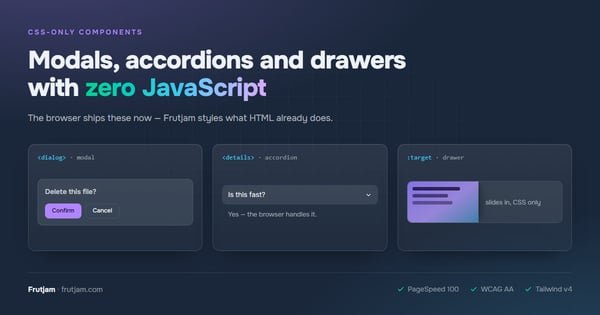
The idea that you need JavaScript to build a polished, interactive web application has been quietly falling apart for years. The native web platform — HTML and CSS — now handles more UI patterns than most developers realize. Accordions, drawers, tabs, animated transitions, and accessible form controls: all achievable without a single line of JavaScript.
Frutjam is a Tailwind CSS component library built on this principle. The vast majority of components require zero JavaScript. Here is what that looks like in practice, and why it matters for your performance, accessibility, and development velocity.
The Browser Has Caught Up
A few years ago, the case for JavaScript-driven UI was legitimate. The browser had no native way to create accessible modals with focus trapping, toggle accordions with smooth animations, or build floating popovers with correct positioning.
Today, every one of those has a native solution:
| Old JavaScript pattern | Native CSS/HTML replacement |
|---|---|
| Modal library (Bootstrap, MUI) | <dialog> element + showModal() (one line of native JS) |
| Accordion component | <details> / <summary> |
| Toggle / swap | Checkbox + CSS :checked |
| Floating popover | Native Popover API |
| Drawer / side panel | Checkbox + CSS :has() |
| Animated transitions | CSS @starting-style + transition |
| Tab switching | Radio inputs + CSS :checked |
| Tooltip | CSS :hover + popover |
Frutjam wraps all of these patterns into clean, semantic component classes built on Tailwind CSS. The result is a fully interactive UI with zero JavaScript.
Why Zero JavaScript UI Matters
Core Web Vitals and PageSpeed
JavaScript is the single largest contributor to poor Core Web Vitals scores. Parsing and executing JS blocks the main thread, causing:
- High Total Blocking Time (TBT) — the metric that most directly predicts user-perceived slowness
- Delayed Time to Interactive (TTI) — when the page becomes usable
- Layout shifts from late-rendering JS components — Cumulative Layout Shift (CLS)
Removing UI JavaScript eliminates these problems at the root. There is nothing to parse, nothing to initialize, nothing to cause a layout shift. Your server renders HTML; the browser displays it immediately. That is a PageSpeed 100 by default, not by optimization.
Google uses Core Web Vitals as a ranking signal. Pages with lower TBT and CLS rank better, all else being equal. Zero JavaScript components give you a structural advantage here — not a performance trick you apply after the fact.
Accessibility Without Configuration
Native HTML elements carry built-in accessibility semantics. A <dialog> traps focus automatically. A <details> announces its open/closed state to screen readers without any aria-* attributes. A radio-based tab interface is keyboard-navigable out of the box.
Frutjam adds WCAG AA color contrast on top — every component's color tokens pass contrast requirements. You get accessible UI without writing aria-expanded, aria-controls, or role attributes for the core components.
Works Everywhere, Re-Initializes Nowhere
When your UI layer has no JavaScript, it works in any rendering context without additional setup:
- Django templates — server-rendered HTML, no client-side framework needed
- HTMX — partial HTML swaps work without re-initialization callbacks
- Laravel Blade — same HTML, same components, same behavior
- React / Next.js — CSS-only components work alongside React with less client-side overhead
- Static site generators — HTML output renders correctly on first paint
This matters most for HTMX and server-rendered stacks, where JavaScript-initialized components silently break when the DOM is replaced.
Browser Support
All Frutjam components rely on features that are fully supported in modern browsers:
| Feature | Chrome | Firefox | Safari | Edge |
|---|---|---|---|---|
<dialog> + Popover API | ✓ 114+ | ✓ 122+ | ✓ 17+ | ✓ 114+ |
<details> / <summary> | ✓ All | ✓ All | ✓ All | ✓ All |
CSS :has() | ✓ 105+ | ✓ 121+ | ✓ 15.4+ | ✓ 105+ |
CSS @starting-style | ✓ 117+ | ✓ 129+ | ✓ 17.5+ | ✓ 117+ |
Coverage is effectively 95%+ of global users as of 2025. The <details> element has had universal browser support since 2016.
Real Components, Zero JavaScript
Modal
The Frutjam modal uses the native <dialog> element. Opening requires one line of native browser JS — showModal() — via an inline onclick attribute. No library, no initialization, no bundle to load:
<button class="btn" onclick="confirmModal.showModal()">Delete item</button>

<dialog class="modal modal-center modal-middle modal-slide-up" id="confirmModal">
  <div class="modal-content">
    <h2 class="heading-lg">Are you sure?</h2>
    <p class="para">This action cannot be undone.</p>
    <div class="flex gap-2 justify-end mt-4">
      <button class="btn" onclick="confirmModal.close()">Cancel</button>
      <button class="btn btn-error" onclick="confirmModal.close()">Delete</button>
    </div>
  </div>
  <button class="modal-backdrop" onclick="confirmModal.close()">Close</button>
</dialog>
showModal() is a native HTMLDialogElement method — it is part of the browser, not a library. The <dialog> element handles focus trapping, ESC key dismissal, and top-layer rendering automatically. The slide-up animation (modal-slide-up) is pure CSS.
Animated Accordion
<details class="accordion">
  <summary class="accordion-header">
    What is CSS-only UI?
  </summary>
  <div class="accordion-body">
    <p>UI components that require no JavaScript to function. State is managed
    by the browser via native HTML elements and CSS selectors.</p>
  </div>
</details>
The @starting-style CSS rule in Frutjam animates the expand/collapse. No JavaScript event listeners, no animation libraries.
CSS-Only Tab Panels
<div class="tabs tabs-boxed">
  <input type="radio" name="code-tabs" class="tab" aria-label="HTML" checked>
  <div class="tab-content">HTML version here</div>

  <input type="radio" name="code-tabs" class="tab" aria-label="React">
  <div class="tab-content">React version here</div>

  <input type="radio" name="code-tabs" class="tab" aria-label="Django">
  <div class="tab-content">Django template version here</div>
</div>
The CSS :checked selector drives which panel is visible. Keyboard navigation between tabs is browser-native via arrow keys.
Drawer
<input type="checkbox" id="drawer-toggle" class="drawer-toggle">
<div class="drawer-content">
  <label for="drawer-toggle" class="btn">Open Sidebar</label>
</div>
<div class="drawer-side">
  <label for="drawer-toggle" aria-label="Close" class="drawer-overlay"></label>
  <nav class="menu bg-base-100 min-h-full w-64 p-4">
    <li><a href="/">Home</a></li>
    <li><a href="/components">Components</a></li>
  </nav>
</div>
Open/close state lives in the checkbox. CSS :has(:checked) drives the layout. No JavaScript involved.
Toast Notifications
<div class="toast toast-top toast-end">
  <div class="alert alert-success">
    <span>Changes saved successfully.</span>
  </div>
</div>
Frutjam's toast is positioned via CSS. For timed auto-dismiss, a single CSS animation handles the fade-out — no JavaScript timer required for the basic pattern.
Searchable Combobox
A combobox is one UI pattern where pure CSS hits a real limit: filtering a list as the user types requires JavaScript. But you do not have to write it yourself.
Frutjam ships createCombobox from frutjam/js — a built-in helper that adds filtering, keyboard navigation (↑ ↓ Enter Escape), and aria-* wiring in a single call. The open/close behavior is still CSS-only (focus-within:combobox-open):
<div class="relative w-64 focus-within:combobox-open">
  <input type="text" class="input w-full" placeholder="Search...">
  <ul class="combobox-list">
    <li class="combobox-item">React</li>
    <li class="combobox-item">Vue</li>
    <li class="combobox-item">Angular</li>
    <li class="combobox-item">Svelte</li>
  </ul>
</div>
import { createCombobox } from 'frutjam/js'
createCombobox(document.querySelector('.my-combobox'))
The browser has no native combobox element. When a UI pattern genuinely requires JavaScript, Frutjam provides it — so you are not writing filtering logic, keyboard handling, and ARIA attributes from scratch every time.
What You Do Not Give Up
The common concern with zero JavaScript UI is capability. For standard UI components, there is no meaningful sacrifice:
- Smooth animations — CSS
@starting-styleandtransitionhandle enter/exit animations natively - Focus management —
<dialog>traps focus natively; focus returns to the trigger on close - Keyboard navigation — native inputs are keyboard-navigable without writing event listeners; combobox keyboard nav is handled by the built-in
createCombobox()helper - Dark mode —
data-themeattribute switching with zero JavaScript
Where JavaScript is genuinely necessary — form validation with real-time feedback, async data fetching, complex application state — tools like HTMX handle it at the request/response level, not the component level. Your UI components stay clean and framework-agnostic.
Installation
Install Frutjam alongside Tailwind CSS:
npm install -D frutjam
Add two lines to your CSS:
@import "tailwindcss";
@plugin "frutjam";
Apply a theme to your HTML root:
<html data-theme="darkberry">
Every component is immediately available. No JavaScript configuration, no plugin initialization, no build step beyond Tailwind itself.
Frequently Asked Questions
Do Frutjam components work with React or Next.js?
Yes. React renders HTML; Frutjam styles HTML. You apply Frutjam class names to JSX elements the same way you apply any CSS class. For modals, call document.getElementById("myModal").showModal() from React state — the <dialog> handles everything else. Accordions, drawers, and tabs need zero React state at all.
What about form validation without JavaScript?
CSS-only validation works for required fields, pattern matching, and email format checking using the :invalid and :valid pseudo-classes. For complex validation logic or async server-side checks, a minimal amount of JavaScript (or HTMX) is appropriate. The point is not to eliminate JavaScript entirely — it is to stop using JavaScript for UI state that native HTML handles better.
Is <dialog> supported on mobile?
Yes. The <dialog> element has been supported in Safari on iOS since version 15.4 (released March 2022), Chrome Android since version 37, and Firefox Android since version 98. Global mobile coverage is above 95%.
How do I animate component open/close without JavaScript?
Frutjam uses CSS @starting-style combined with transition to animate components in and out. This is a native CSS feature supported in all modern browsers since 2023–2024. The animation is defined in the library — you get smooth transitions on <dialog>, <details>, and popover elements without any JavaScript or animation library.
Can I use Frutjam alongside a JavaScript framework like Alpine.js?
Yes. Frutjam does not own any DOM state, so it coexists cleanly with Alpine.js, Stimulus, or any small JS library. Accordions and drawers are entirely CSS — Alpine never touches them. For modals, you can use either Frutjam's native showModal() or wire it to an Alpine variable — both work.
What Zero JavaScript UI Looks Like in Production
A production page using Frutjam typically has three assets:
| Asset | Size (min+gzip) | Notes |
|---|---|---|
| Tailwind CSS (JIT) | ~5–8 KB | Base utilities, only used classes |
| Frutjam CSS (JIT) | ~12–18 KB | Component styles, only used classes |
| HTMX (optional) | ~14 KB | Only if you need dynamic content |
Total page weight for a UI-heavy page: ~20–40 KB with zero JavaScript UI components. Compare this to a typical React + UI library setup at 150–400 KB before application code. The difference is measurable in Lighthouse scores, Core Web Vitals, and user-perceived load time — especially on mobile networks.